

It is one of the most common requests we get from new customers: “Can you just forward my calls to my cell phone?”
We understand the thinking. You want to make sure you never miss a call. You are out of the office, on the road, working from home. Call forwarding sounds like a simple safety net.
But after setting up phone systems for small businesses for many years now, we strongly advise against it. Call forwarding to a personal cell phone creates more problems than it solves, and there is a better option that gives you everything you want without the downsides.
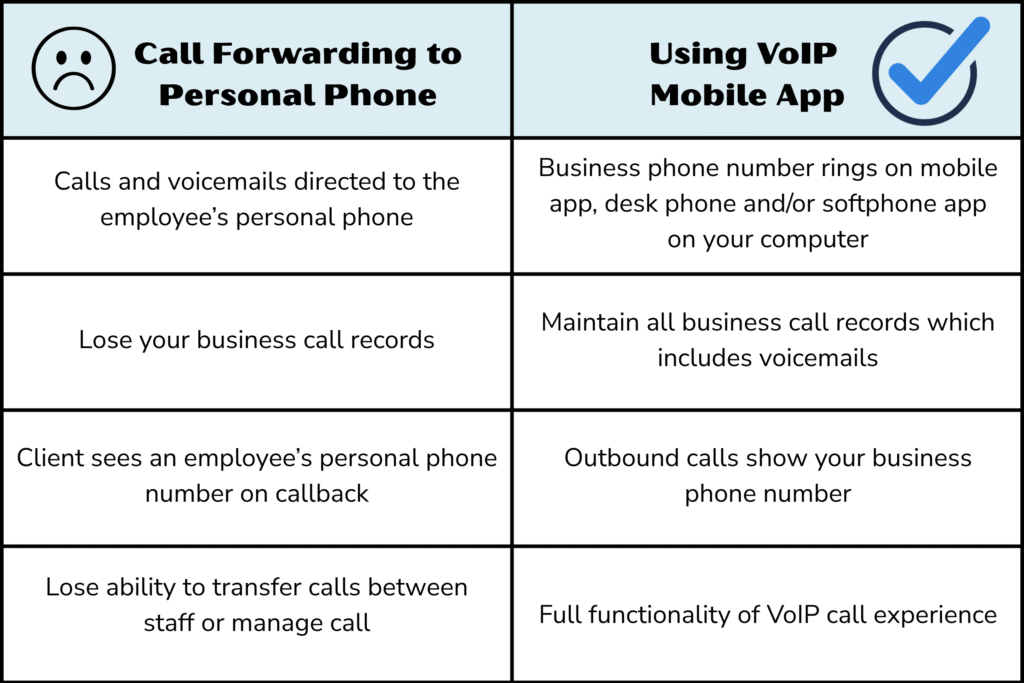
What Actually Happens When You Forward Business Calls to a Personal Cell Phone
When you set up call forwarding to a personal cell phone, your business phone system sends the call to that employee’s personal number.
It sounds straightforward, but here is what it actually means in practice:
Voicemails go to the employee’s personal voicemail. If the employee does not answer, the call does not bounce back to your business voicemail system. It lands on their personal phone’s voicemail instead.
That means the voicemail greeting is personal, the message is stored on their device, and you as the business owner have no visibility into it. The caller hears “Hey, this is Mike” instead of your company’s professional greeting. And Mike might not check that voicemail until tomorrow.
You lose your business call records. Your business phone system tracks every call: who called, when, how long the conversation lasted, and whether it was answered. When a call forwards to a personal cell phone, that tracking ends the moment the call leaves your system. You have no record of whether the call was answered, what was discussed, or if a voicemail was left.
The client sees an employee’s personal number on callback. If the employee calls the client back from their personal cell phone, the client now has that employee’s personal number. That creates problems when the employee leaves the company, changes roles, or simply does not want clients calling them at 9 PM on a Saturday.
You cannot transfer or manage the call. Once a call forwards to a cell phone, it is outside your phone system. The employee cannot transfer it to a colleague, put the caller in a queue, or conference in another team member. It is just a regular cell phone call at that point.
Why Small Businesses Ask for Call Forwarding in the First Place
The request almost always comes from a good place. Business owners and their teams want to be reachable. They worry about missing calls during lunch, while commuting, or when working remotely. The fear of a missed call turning into a missed deal is real.
And that fear is justified. Research shows that 80% of business callers who reach voicemail will not leave a message. If a potential customer calls and nobody answers, there is a good chance they are calling your competitor next.
The problem is not the goal. The problem is the method. Call forwarding to a personal device is a workaround, not a solution. It trades one risk (missed calls) for a set of new risks (lost voicemails, no call tracking, unprofessional experience, and blurred personal boundaries).
The Better Approach: Use Your VoIP Provider’s Mobile App
Modern business VoIP systems come with a mobile app that runs on your smartphone. This is not call forwarding. It is your actual business phone system running on your personal device over cellular data or Wi-Fi.
Here is why using a VoIP mobile app works for your business:
Your business number rings on your phone. When a client calls your business number, it rings on your desk phone and your mobile app at the same time. You answer whichever device you have in hand. The caller has no idea whether you picked up from your office or from a park bench.
Voicemails stay in your business system. If you miss the call, it goes to your business voicemail with your professional greeting. The voicemail is stored in your phone system where you and your team can access it, and it shows up as a notification in the mobile app. No messages lost on personal devices.
Outbound calls show your business number. When you call a client back from the mobile app, your business caller ID is displayed, not your personal cell number. The client never sees your personal number. When the employee leaves, the business number stays with you.
Full call functionality is available. From the mobile app, you can transfer calls to colleagues, put callers on hold, start a conference call, check voicemail transcriptions, and see your team’s availability. It is the same experience as being at your desk.
Call records are complete. Every call made or received through the mobile app is logged in your business phone system. Duration, time, caller ID, recording (if enabled). Nothing falls through the cracks.
What About Internet Outages?
This is the other reason people ask for call forwarding: “What happens if my internet goes down?”
It is a fair question. VoIP needs an internet connection. If the office internet goes down, the desk phones stop working. That sounds like a good reason to forward calls to cell phones as a failover, right?
Not quite.
Here is what actually happens when your office internet goes down and you have the mobile app installed:
- Your desk phones stop ringing because they are on office internet
- Your mobile app keeps working because it runs on your phone’s cellular data or home Wi-Fi
- Calls ring to the mobile app automatically, just like they always do
- You answer on your phone, with full business functionality, using your business caller ID
The mobile app is the failover. It runs on a completely separate network from your office internet. There is no need to configure call forwarding as a backup because the app is already your backup by default.
The only scenario where both fail simultaneously is if your office internet goes down AND you have no cellular data. In most areas, that is an extremely unlikely combination.
The Employee Boundary Problem Nobody Talks About
There is one more reason we advise against call forwarding to personal cell phones that often gets overlooked: your employees’ personal boundaries.
When you forward business calls to an employee’s personal phone, that employee is now receiving business calls on the same device they use for everything else in their life. There is no off switch. Clients who have that personal number will call it directly, bypassing your phone system entirely. And when the employee leaves the company, those client relationships are tied to a number you do not control.
The American Psychological Association reports that the inability to disconnect from work is a leading contributor to employee burnout. A mobile app solves this cleanly: the employee can log out of the app at the end of the day, and calls follow whatever after-hours routing you have configured (voicemail, on-call rotation, etc.). The business number stays with the business. The personal number stays personal.
Call Forwarding vs. Mobile App: Side by Side Comparison
Here is a quick comparison to make the differences clear why a mobile app is a better alternative to call forwarding.
Call Forwarding to Cell Phone:
• Voicemails go to employee’s personal voicemail
• Caller sees personal number on callback
• No call records in business system
• Cannot transfer, hold, or conference
• No way to “turn off” after hours
• Client relationships tied to personal numbers
VoIP Mobile App:
• Voicemails go to business voicemail with professional greeting
• Business caller ID on all outbound calls
• Full call records and analytics
• Transfer, hold, conference, voicemail transcription
• Log out at end of day, after-hours routing takes over
• Business number stays with the business
Frequently Asked Questions
Can I still set up call forwarding to a cell phone if I want to?
Yes, most VoIP systems support call forwarding to external numbers. We do not disable the feature. We simply advise against it because the mobile app provides the same reachability without the downsides. If a client insists on call forwarding for a specific use case, we will configure it and explain the trade-offs.
Does the mobile app use a lot of data?
A VoIP call uses roughly 0.5 to 1 MB per minute. A 10-minute call uses about 5 to 10 MB. For context, streaming a song on Spotify uses about the same amount. Most modern phone plans with unlimited data can handle VoIP calls without any impact on your bill.
What if an employee does not want to install a business app on their personal phone?
That is a valid concern. The mobile app does not access personal data on the phone, and uninstalling it removes all business data. This means your employee’s private data on their phone is never visible to you, the employer. However, if an employee prefers not to use their personal device, they can use a softphone on their laptop or the business can provide a separate device. Another option would be for the employer to offer an employee benefit where the employee would be reimbursed a fixed rate for personal cellular service. The key point is that the mobile app is optional per employee, but call forwarding to personal numbers affects the entire business phone experience.
Does the mobile app work on both iPhone and Android?
Yes. Business VoIP mobile apps are available for both iOS and Android devices. They work over Wi-Fi and cellular data.
What happens to calls if an employee’s phone is turned off or has no signal?
If the mobile app cannot be reached, the call follows your configured routing rules, just like it would if a desk phone was not answered. Typically that means ringing other team members, going to a ring group, or reaching your business voicemail. The call never leaves your system.
For more FAQs, visit: https://remipbx.com/faqs/
Talk to Us About Getting It Right
At RemiPBX, we strongly prefer to set up every customer’s phone system with the mobile app configured from day one. It is included with every plan at no extra cost. We walk your team through how to use it so that when the question “can we just forward calls to our cell phones?” comes up, your team already has the better answer in their pocket. If you are interested in learning more about how RemiPBX can help your team, contact us today.


